As organizations continue investing in artificial intelligence, machine learning, and large-scale analytics, managing data securely has become just as important as processing it. Modern businesses are working with data spread across multiple teams, cloud platforms, applications, and business units. Without a centralized governance strategy, it becomes difficult to control who can access data, maintain compliance, and ensure that sensitive information is properly protected.
Unity Catalog provides a centralized governance solution for data, AI assets, notebooks, machine learning models, and other data objects within Databricks. Instead of managing permissions separately across different workspaces, organizations can define governance policies in one place while maintaining visibility across their entire data environment.
For organizations building modern Lakehouse architectures, Unity Catalog has become one of the most important features in Databricks. It improves security, simplifies governance, supports regulatory compliance, and creates the strong data foundation needed for analytics and AI.
In this guide, we will explain what Unity Catalog is, why it matters, how to set it up, best practices for governance, and how Tenplus helps organizations implement secure and scalable Databricks environments.
- What Is Unity Catalog?
- Why Unity Catalog Is Important
- Key Features of Unity Catalog
- How Unity Catalog Supports Data Governance
- Prerequisites Before Setting Up Unity Catalog
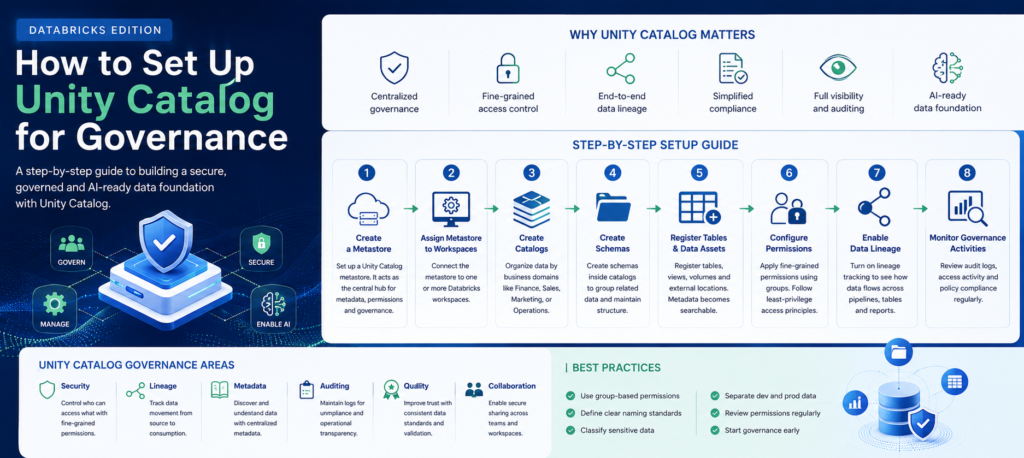
- Step 1: Create a Metastore
- Step 2: Assign the Metastore to Workspaces
- Step 3: Create Catalogs
- Step 4: Create Schemas
- Step 5: Register Tables and Data Assets
- Step 6: Configure Permissions
- Step 7: Enable Data Lineage
- Step 8: Monitor Governance Activities
- Best Practices for Unity Catalog Governance
- Common Mistakes Organizations Make
- How Unity Catalog Supports AI and Machine Learning
- How Tenplus Helps Organizations Implement Unity Catalog
- Conclusion
- FAQs
What Is Unity Catalog?
Unity Catalog is Databricks’ centralized governance solution for managing data and AI assets across an organization.
It allows businesses to manage permissions, metadata, data lineage, auditing, and governance policies from a single location instead of configuring them separately for every workspace.
With Unity Catalog, organizations can govern:
- Tables
- Views
- Schemas
- Catalogs
- Volumes
- Machine learning models
- Notebooks
- Files
- External data locations
Rather than treating governance as an afterthought, Unity Catalog makes security and governance part of the overall data architecture.
Why Unity Catalog Is Important
As organizations grow, so does the complexity of their data environments.
Multiple teams often access the same datasets. Different business units create their own pipelines. Data engineers, analysts, and data scientists all require different levels of access.
Without centralized governance, organizations commonly experience:
- Duplicate permission management
- Inconsistent security policies
- Compliance challenges
- Limited visibility into data usage
- Difficulty tracking data lineage
Unity Catalog addresses these challenges by providing one consistent governance layer across the Databricks environment.
This improves operational efficiency while reducing security and compliance risks.
Key Features of Unity Catalog
Unity Catalog includes several capabilities that help organizations manage modern data platforms.
Centralized Access Control
Administrators can manage permissions from one location instead of configuring each workspace independently.
This simplifies administration while ensuring that governance policies remain consistent across the organization.
Fine-Grained Permissions
Organizations can control access at multiple levels.
Permissions can be assigned to:
- Catalogs
- Schemas
- Tables
- Views
- Columns
- Rows
This level of control helps organizations protect sensitive information while allowing teams to access the data they need.
Data Lineage
Understanding where data comes from is critical for governance.
Unity Catalog automatically tracks how data moves across the environment.
Organizations can see:
- Source systems
- Data transformations
- Downstream usage
- Report dependencies
This visibility improves trust and simplifies troubleshooting.
Centralized Metadata
Metadata helps users understand the meaning and purpose of datasets.
Unity Catalog stores metadata centrally, making it easier for teams to discover and understand available data assets.
Built-In Auditing
Organizations need visibility into how data is accessed and used.
Unity Catalog records governance activities, helping organizations support:
- Compliance
- Security monitoring
- Internal audits
- Operational reviews
How Unity Catalog Supports Data Governance
Governance is much more than assigning permissions.
It requires consistent policies that support business operations while protecting valuable information.
Unity Catalog strengthens governance by improving several important areas.
Data Security
Sensitive information remains protected through centralized access management and permission controls.
Organizations can reduce unauthorized access while improving operational visibility.
Data Quality
Centralized governance encourages consistent data management practices across business units.
This improves confidence in analytics and reporting.
Compliance
Many organizations must comply with regulations that require visibility into data access and usage.
Unity Catalog provides audit logs and governance capabilities that support compliance efforts.
Collaboration
Different teams can work with shared datasets while maintaining appropriate security controls.
This improves productivity without compromising governance.
Quick link: A Guide to Data Governance Frameworks
Prerequisites Before Setting Up Unity Catalog
Before configuring Unity Catalog, organizations should review their existing Databricks environment.
Several areas should be prepared in advance.
Confirm Workspace Requirements
Unity Catalog works with supported Databricks workspaces that meet the necessary platform requirements.
Organizations should verify compatibility before implementation.
Configure Cloud Storage
Unity Catalog requires managed storage for metadata and managed tables.
Depending on the cloud provider, this may involve configuring storage accounts or object storage services.
Establish Identity Management
User identities should already be managed through an identity provider.
This allows permissions to be assigned using groups instead of individual users whenever possible.
Define Governance Policies
Organizations should determine:
- Data ownership
- Access policies
- Naming conventions
- Classification standards
These governance decisions should be made before technical implementation begins.
Step 1: Create a Metastore
The first step is creating a Unity Catalog metastore.
A metastore acts as the central governance layer for the Databricks environment.
It stores:
- Metadata
- Permissions
- Governance information
Multiple workspaces can connect to the same metastore, allowing organizations to manage governance centrally.
Step 2: Assign the Metastore to Workspaces
After creating the metastore, it must be assigned to the appropriate Databricks workspaces.
This allows multiple teams to operate under the same governance policies.
Instead of managing permissions separately, organizations maintain one consistent governance model.
Step 3: Create Catalogs
Catalogs provide the highest level of organization within Unity Catalog.
Many organizations create catalogs based on business functions.
Examples include:
- Finance
- Sales
- Marketing
- Operations
- Engineering
Separating catalogs by business domain improves organization and simplifies permission management.
Step 4: Create Schemas
Schemas organize objects inside each catalog.
For example, a Finance catalog might include schemas such as:
- Reporting
- Forecasting
- Transactions
- Budgeting
This additional layer helps maintain a logical data structure.
Step 5: Register Tables and Data Assets
Once catalogs and schemas are available, organizations can begin registering:
- Tables
- Views
- External locations
- Files
- Volumes
At this stage, metadata becomes searchable across the organization.
Users can discover available assets more easily.
Step 6: Configure Permissions
Access control is one of the most important parts of Unity Catalog.
Permissions should follow the principle of least privilege.
This means users only receive access necessary for their responsibilities.
Organizations should grant permissions using groups rather than assigning access individually.
This simplifies administration as teams grow.
Step 7: Enable Data Lineage
Data lineage provides visibility into how information moves through the platform.
Organizations should verify that lineage tracking is enabled.
This helps answer questions such as:
- Where did this report originate?
- Which pipeline created this table?
- What downstream dashboards depend on this dataset?
Lineage improves governance and supports troubleshooting.
Step 8: Monitor Governance Activities
Governance should be monitored continuously.
Organizations should regularly review:
- Permission changes
- Data access activity
- Audit logs
- Policy compliance
Continuous monitoring helps identify security risks before they become major problems.

Best Practices for Unity Catalog Governance
Successful implementations follow several proven practices.
Use Group-Based Permissions
Managing permissions through user groups simplifies administration and reduces errors.
Separate Development and Production Data
Production data should remain isolated from development environments.
This reduces operational risks while protecting sensitive information.
Apply Consistent Naming Standards
Clear naming conventions improve discoverability and reduce confusion.
Organizations should standardize names for:
- Catalogs
- Schemas
- Tables
- Data products
Classify Sensitive Data
Not all information requires the same level of protection.
Organizations should classify datasets based on sensitivity and apply appropriate security controls.
Review Permissions Regularly
Access requirements change over time.
Periodic reviews help ensure permissions remain appropriate.
Common Mistakes Organizations Make
Many businesses experience governance issues because of avoidable mistakes.
Assigning Permissions Individually
Managing users one by one becomes difficult as organizations grow.
Group-based access provides better scalability.
Ignoring Data Lineage
Without lineage, troubleshooting and compliance become significantly more difficult.
Weak Naming Standards
Poor naming conventions reduce discoverability and create confusion across teams.
Delaying Governance
Some organizations wait until data platforms become large before implementing governance.
It is much easier to build governance early than to retrofit it later.
How Unity Catalog Supports AI and Machine Learning
Artificial intelligence depends on trusted and governed data.
Unity Catalog helps AI initiatives by improving:
- Data quality
- Security
- Metadata management
- Data lineage
- Access control
Data scientists can work confidently knowing they are using governed datasets with clear ownership and visibility.
This creates stronger foundations for machine learning and generative AI projects.
How Tenplus Helps Organizations Implement Unity Catalog
Implementing Unity Catalog successfully requires more than enabling a feature within Databricks.
Organizations need governance strategies that align with business objectives, security requirements, compliance obligations, and long-term data architecture.
The team helps businesses:
- Design Lakehouse architectures
- Implement Unity Catalog
- Define governance policies
- Improve data security
- Build scalable permission models
- Implement data lineage
- Strengthen compliance readiness
- Prepare data platforms for AI initiatives
Rather than creating unnecessary complexity, Tenplus focuses on practical governance that supports business growth while maintaining security and operational efficiency.
Tenplus also offers a free proof of concept, allowing organizations to validate governance strategies before making larger technology investments.
Conclusion
Unity Catalog has become one of the most important governance capabilities within the Databricks ecosystem. As organizations continue building modern data platforms and investing in AI, centralized governance is essential for maintaining security, compliance, and operational consistency.
By implementing Unity Catalog correctly, businesses can simplify access management, improve visibility, strengthen data governance, and create trusted data environments that support long-term innovation.
If your organization is planning a Databricks implementation or looking to modernize its governance strategy, Tenplus can help design, deploy, and optimize Unity Catalog as part of a scalable Lakehouse architecture that supports analytics, machine learning, and future AI initiatives.
FAQs
What is Unity Catalog?
Unity Catalog is Databricks’ centralized governance solution that manages metadata, permissions, data lineage, and security across multiple workspaces.
Why is Unity Catalog important?
It simplifies governance by providing centralized access control, auditing, metadata management, and data lineage across an organization’s Databricks environment.
Does Unity Catalog support data lineage?
Yes. Unity Catalog automatically tracks data lineage, helping organizations understand how data moves across tables, pipelines, notebooks, and reports.
Can Unity Catalog improve compliance?
Yes. Its centralized governance, audit logs, fine-grained permissions, and metadata management help organizations support regulatory and internal compliance requirements.
How can Tenplus help with Unity Catalog implementation?
Tenplus helps organizations design governance frameworks, implement Unity Catalog, strengthen security, optimize Databricks architectures, and build AI-ready Lakehouse platforms.